I feel like people maybe flipped out a little more than necessary, so I want to remind everyone that Yahoo tends to beat websites to death and then leave their corpses in the street – Del.icio.us was an anomaly in that respect – so it’s not like Tumblr’s going to disappear tomorrow. If Yahoo sells Tumblr we’ll hear about it first and have time to take appropriate measures.
(Who the fuck would buy Tumblr? Microsoft. Microsoft, owner of Bing, would buy Tumblr.)
That said, BACKING STUFF UP IS A GOOD IDEA. BACK UP YOUR SHIT. DO IT, LISTEN TO YOUR INTERNET FATHER. You know when I learned this? When in 2008 my livejournal was hacked and I lost five years of my life. I resurrected about 80%, and you know where that 80% came from? Google cache, Archive.org, and notification emails people happened to have saved. BACKUPS. And even then I had to copy and paste every post and repost it backdated. It took me eight months.
When del.icio.us was sold, data was lost, but more importantly, the data that remained had to be moved, which was when I discovered that about a quarter of the fanfics I’d bookmarked were now deleted, locked, or otherwise missing (this was pre-AO3 but fanfics can be deleted from AO3, and they can be deleted from Tumblr). I rescued a few from archive.org but I also lost a good number, which is why I use Evernote to archive not just the URLs but the stories themselves.
No technology is infallible, unhackable, virus-proof, or incorruptible. Back up your hard drive, or at least the parts with your favorite music and family photos. Back up your tumblr, or at least the entries that are important to you. Love that fanfic? Save a copy of it.
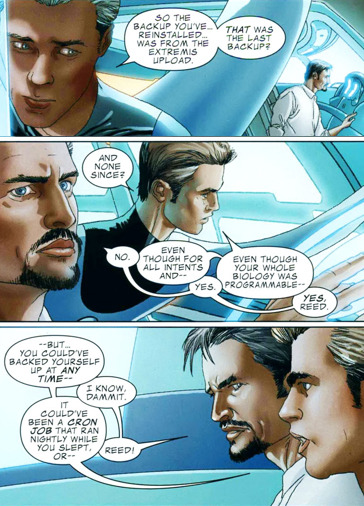
You know what happens to people who don’t back up their shit? They get sanctimonious but ultimately correct lectures from Reed Richards.
Maybe I missed this post, but what technology are you using to crosspost between Tumblr and DW?
I’m using a website called IFTTT (If This, Then That) which I’ve programmed to check my tumblr every 15 minutes and crosspost anything it finds there if it’s tagged properly.
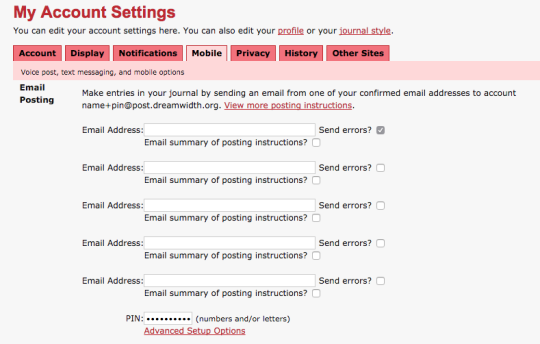
IFTTT does this by yanking the post off Tumblr, throwing it into an email, and emailing it to Dreamwidth, which means you have to set up Dreamwidth to accept email posting.
Any of these recipes can be used to crosspost to an active DW/LJ where you talk with friends and they read your posts, or they can be used to crosspost to an “archival” account if you just want to archive off-site. Be aware however that IFTTT only pulls the first image of any given post, so if you archive a multiple-image post it will be incomplete.
Here are some resources:
Universal Crossposting: this post (not by me) has instructions for how to set up IFTTT to crosspost everything you post on Tumblr to your DW/LJ. It also contains instructions for how to set up Dreamwidth for email posting.
Crossposting only posts you tag to crosspost: set up IFTTT to crosspost ONLY if you tag the post “crosspost”. This has some quirks; it will include the first image in the post, but if there’s no image attached to the post it will put a big “NO IMAGE FOUND” banner on your DW post, which is ugly. So:
Crossposting only TEXT posts you tag to crosspost: this recipe (by me) is identical to the one above, but it uses the tag “textpost”. It will only crosspost posts you tag “textpost”, and it will not include images, even if images are attached to the post.
I hope this helps! Also be aware that if you click “advanced options” on either of my recipes, you should be able to change the tag from “crosspost” or “textpost” to a tag of your own choosing.
Crossposting between dw and tumblr. Great instructions. Pls use in the tumblr exodus
Forget the mixing bowl, TELL ME HOW YOU CROSS-POSTED THIS.
Iiiiiii copied and pasted. 😀 Sorry. As far as I know there’s no auto-crosspost from Dreamwidth. In theory someone who knows how to do such things should be able to write a script that would do it, but I wouldn’t begin to know how.
In the box, enter whatever email address you connected in IFTTT. For your pin, go crazy but note that DW doesn’t save capital letters in the pin.
Then string together your account name with your pint in the following form: username+pin@post.dreamwidth.org.
Now head back to your IFTTT recipe box:
And enter in that username+pin@post.dreamwidth.org into your address bar.
YOU’RE SET TO CROSSPOST.
A word of caution: This recipe will crosspost EVERYTHING on Tumblr, both your new content and all your reblogs. You can turn off the automatic push in the recipe’s top right-hand corner:
And then turn it on just before you make a super-important post. Like this one.


 Tumblr Exodus