Short version: Livejournal’s servers are now in Russia. If you still do journaling that is not tumblr then Dreamwidth is where most people are migrating to. The link above has more info on the backstory behind LJ as well as links at the end of the post on how to migrate your content over to DW intact. (Highly recommended. Have been on DW since it was beta. Was on LJ since September 2000).
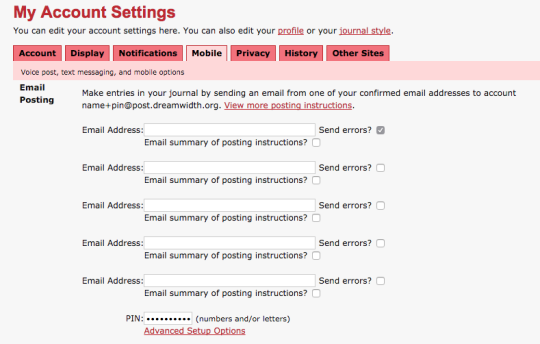
In the box, enter whatever email address you connected in IFTTT. For your pin, go crazy but note that DW doesn’t save capital letters in the pin.
Then string together your account name with your pint in the following form: username+pin@post.dreamwidth.org.
Now head back to your IFTTT recipe box:
And enter in that username+pin@post.dreamwidth.org into your address bar.
YOU’RE SET TO CROSSPOST.
A word of caution: This recipe will crosspost EVERYTHING on Tumblr, both your new content and all your reblogs. You can turn off the automatic push in the recipe’s top right-hand corner:
And then turn it on just before you make a super-important post. Like this one.
I don’t know if this is relevant to anyone, but I just went on livejournal for the first time in months to look for some old fanfiction I had bookmarked on my livejournal “memories” page.
PSA: You can no longer navigate to your “memories” page through any of the various account pages, navigation bars, or dropdown menus the site now offers. The page still exists, but the only way to access it is to type the following url directly into your address bar:
livejournal.com/tools/memories.bml?user=USERNAME
I figure if they’ve made the page this hard to access, it’s not long before they delete it altogether, so if you have fic/art/vids/etc. bookmarked in your LJ memories you might want to make sure you save those bookmarks somewhere outside of livejournal.
thanks for the heads up. I can still see the Memories link in my style but who knows how long functionality will last. :(( I’m saving stuff out.


 Tumblr Exodus